GamiPress Extension
Integrate GamiPress gamification features with Keap contact data for points, achievements, and ranks.
Introduction
GamiPress allows you to provide digital awards to your users for interacting with your WordPress website.
GamiPress provides three ways to reward your users: Points, Achievements and Ranks.
- Points – Point types allow you to automatically award your users for interacting with your site.
- Achievements – Achievement types allow you to award achievements to users for completing a specified series of requirements, sequentially or otherwise.
- Ranks – Rank types allow your users to climb through the rank hierarchy by completing a specified series of requirements, sequentially or otherwise.
For all three methods you can define as many types as you wish.
You can use all the reward types individually or in combination.
Very many plugins exist for GamiPress to provide rewards for all types of user actions on your WordPress site.
About the Extension
The iMember360 GamiPress Extension enables the:
- Award and deduction of GamiPress points using conditions based upon Keap tags.
- Award and deduction of GamiPress points using conditions based upon Keap contact fields.
- Setting of requirements for the earning of GamiPress achievements using conditions based upon Keap tags.
- Setting of requirements for the earning of GamiPress achievements using conditions based upon Keap contact fields.
- Setting of requirements for the earning of GamiPress ranks using conditions based upon Keap tags.
- Setting of requirements for the earning of GamiPress ranks using conditions based upon Keap contact fields.
- Storing of GamiPress point totals in selected Keap contact fields.
- Addition/removal of Keap tags when a GamiPress achievement is earned.
- Setting of a Keap contact field when a GamiPress achievement is earned.
- Addition/removal of Keap tags when a GamiPress rank is earned.
- Setting of a Keap contact field when a GamiPress rank is earned.
The iMember360 GamiPress Extension provides an unsurpassed level of integration between Keap and your WordPress site using GamiPress.
All of the iMember360 GamiPress Extension settings are fully integrated into the GamiPress settings. So if you are familiar with GamiPress there is no additional learning curve to using the iMember360 GamiPress Extension.
Activate Extension
The GamiPress plugin must have previously been installed and activated on your site in order to be able to activate the iMember360 GamiPress Extension.
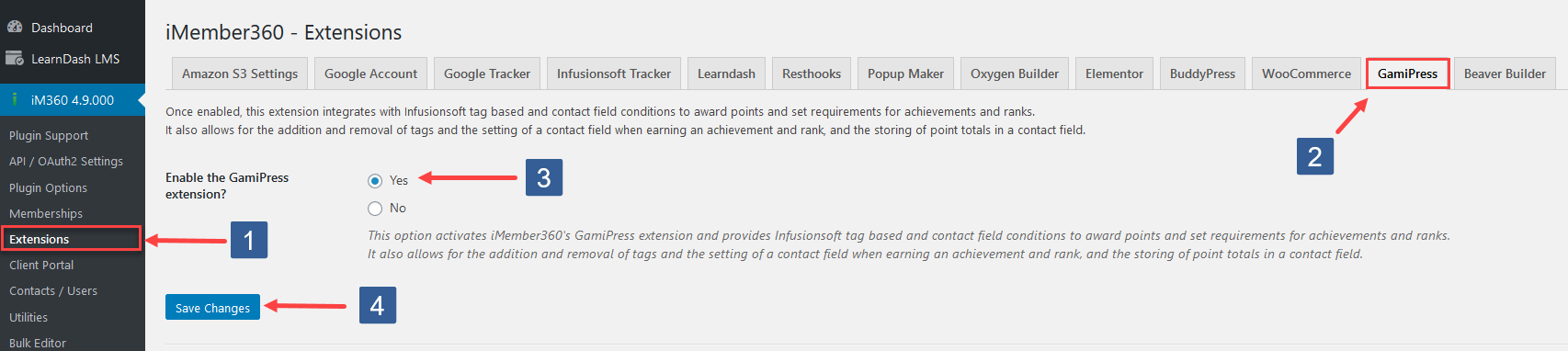
- In WordPress admin sidebar click iMember360, Extensions.
- In iMember360 Extensions tabs click GamiPress.
- Set Enable GamiPress Extension to Yes.
- Click Save Changes.
Configuration
Points – Award, deduct, and store points based on Keap data.
For all point types you can award or deduct based upon:
- The user has all or any of the Keap tags specified.
- The user has a certain value for the Keap contact field specified.
You can also store each point type total in a Keap contact field.
View Documentation →Achievements – Set achievement requirements and earned actions based on Keap data.
For all achievements you can specify required steps toward earning the achievement based upon:
- The user has all or any of the Keap tags specified.
- The user has a certain value for the Keap contact field specified.
You can also add/remove Keap contact tags and set a Keap contact field when the achievement is earned.
View Documentation →Ranks – Set rank requirements and earned actions based on Keap data.
For all ranks (except lowest priority) you can specify rank requirements based upon:
- The user has all or any of the Keap tags specified.
- The user has a certain value for the Keap contact field specified.
You can also add/remove Keap contact tags and set a Keap contact field when a rank is earned.
View Documentation →GamiPress User Status Condition – Use GamiPress data in iMember360 conditionals.
Create conditions based on user achievements, ranks, and points for use in iMember360 conditionals.
View Documentation →