Cornerstone Extension
Control the visibility of Cornerstone elements based on Keap contact data and WordPress user data.
Introduction
Cornerstone is a WordPress page builder designed to make developing WordPress websites simple yet flexible.
About the Extension
iMember360 operates with Cornerstone without any need for the iMember360 Cornerstone Extension. All features of iMember360 work with Cornerstone including shortcodes.
The iMember360 Cornerstone Extension is used solely to control the display of Cornerstone Elements. This enables sophisticated controls for the use of dynamic content, personalization and segmentation.
The iMember360 Cornerstone Extension provides an unsurpassed level of integration between Keap and your WordPress site using Cornerstone.
With the iMember360 Cornerstone Extension enabled, Cornerstone conditions are disabled in preview mode.
Cornerstone Builder Element visibility can be controlled by iMember360 Cornerstone Extension using conditionals based upon:
Contact Tag Status – Conditions based on Keap contact tags.
- Contact has any or all of the tags selected
- Contact does not have any or all of the tags selected
Contact Field Comparison – Conditions based on Keap contact field values.
- Contact has a contact field that compares with a value
- Contact has a contact field that compares with another of their contact fields
User Login Status – Conditions based on WordPress login state.
- User is logged in
- User is not logged in
- User has failed payment status
- It is the user's first login
User Role Status – Conditions based on WordPress user roles.
- User has any or all of the roles selected
- User does not have any or all of the roles selected
PHP Statement – Conditions based on custom PHP code.
- Any WordPress conditional statement
- Any WooCommerce conditional statement
Predefined Conditional – Reference another conditional.
- Predefined Conditional evaluates to true
- Predefined Conditional evaluates to false
GamiPress User Status – Conditions based on GamiPress achievements and ranks.
- User has any or all of the achievements selected
- User does not have any or all of the achievements selected
- User has any or all of the ranks selected
- User does not have any or all of the ranks selected
- User has a points type total that compares with a value
LearnDash User Status – Conditions based on LearnDash course progress.
- User is enrolled in any or all of the courses selected
- User is not enrolled in any or all of the courses selected
- User has not started any or all of the courses selected
- User has in progress any or all of the courses selected
- User has completed any or all of the courses selected
- User has not completed any or all of the lessons selected
- User has completed any or all of the lessons selected
- User has not completed any or all of the topics selected
- User has completed any or all of the topics selected
WooCommerce User Status – Conditions based on WooCommerce purchases.
- User has purchased any or all of the products selected
- User has not purchased any or all of the products selected
- User has pending status for any or all of the subscriptions selected
- User has active status for any or all of the subscriptions selected
- User has on hold status for any or all of the subscriptions selected
- User has pending cancellation status for any or all of the subscriptions selected
- User has cancelled status for any or all of the subscriptions selected
- User has expired status for any or all of the subscriptions selected
…and any multiples and combinations of the above.
Activate Extension
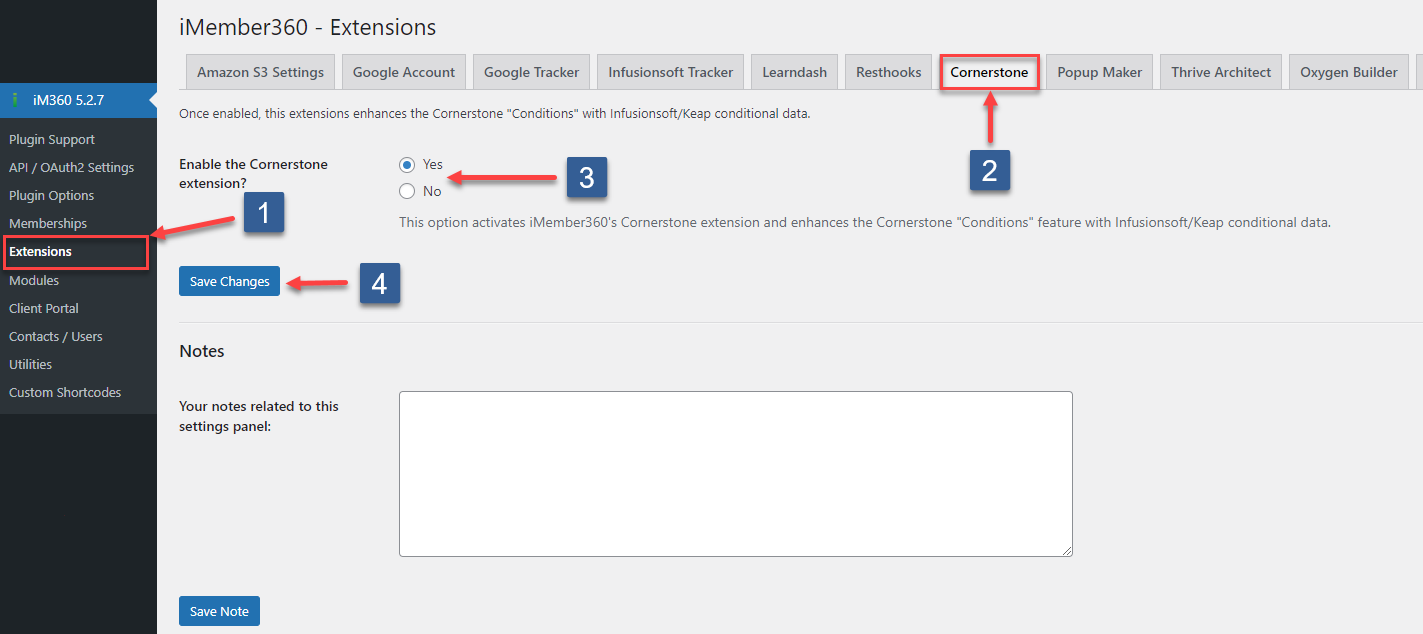
- In WordPress administrator main navigation click iMember360, Extensions.
- In iMember360 Extensions tabs click Cornerstone.
- Set Enable Cornerstone Extension to Yes.
- Click Save Changes.
Configuration
Visibility Conditions – Control element visibility based on various conditions.
Configure visibility for Cornerstone elements using iMember360 Conditionals, Keap Tags, and PHP Statements.
View Documentation →