BuddyPress / BuddyBoss Extension
Control BuddyPress/BuddyBoss group membership and synchronize profile data with Keap.
Introduction
BuddyPress/BuddyBoss is a community plugin for WordPress. It adds social networking features to WordPress and includes features such as member profiles, groups, activity streams, notifications and much more. There is an integration with bbPress to include forum capabilities.
BuddyPress is available as a free plugin from the WordPress Repository. It is created and maintained by the WordPress community. BuddyBoss is a fork of BuddyPress.
About the Extension
The primary purpose of the iMember360 BuddyPress/BuddyBoss Extension is to automatically control the joining and leaving of users as members in BuddyPress/BuddyBoss groups, based upon the Keap contact data and WordPress user data of the logged in user as well as the synchronization of profile data between BuddyPress/BuddyBoss and Keap.
The BuddyPress/BuddyBoss group membership of a user can be controlled by the iMember360 BuddyPress/BuddyBoss Extension based upon:
Contact Tag Status – Conditions based on Keap contact tags.
- Contact has any or all of the tags selected
- Contact does not have any or all of the tags selected
Contact Field Comparison – Conditions based on Keap contact field values.
- Contact has a contact field that compares with a value
- Contact has a contact field that compares with another of their contact fields
User Login Status – Conditions based on WordPress login state.
- User is logged in
- User is not logged in
- User has failed payment status
- It is the user's first login
User Role Status – Conditions based on WordPress user roles.
- User has any or all of the roles selected
- User does not have any or all of the roles selected
PHP Statement – Conditions based on custom PHP code.
- Any WordPress conditional statement
- Any WooCommerce conditional statement
Predefined Conditional – Reference another conditional.
- Predefined Conditional evaluates to true
- Predefined Conditional evaluates to false
GamiPress User Status – Conditions based on GamiPress achievements and ranks.
- User has any or all of the achievements selected
- User does not have any or all of the achievements selected
- User has any or all of the ranks selected
- User does not have any or all of the ranks selected
- User has a points type total that compares with a value
LearnDash User Status – Conditions based on LearnDash course progress.
- User is enrolled in any or all of the courses selected
- User is not enrolled in any or all of the courses selected
- User has not started any or all of the courses selected
- User has in progress any or all of the courses selected
- User has completed any or all of the courses selected
- User has not completed any or all of the lessons selected
- User has completed any or all of the lessons selected
- User has not completed any or all of the topics selected
- User has completed any or all of the topics selected
WooCommerce User Status – Conditions based on WooCommerce purchases.
- User has purchased any or all of the products selected
- User has not purchased any or all of the products selected
- User has pending status for any or all of the subscriptions selected
- User has active status for any or all of the subscriptions selected
- User has on hold status for any or all of the subscriptions selected
- User has pending cancellation status for any or all of the subscriptions selected
- User has cancelled status for any or all of the subscriptions selected
- User has expired status for any or all of the subscriptions selected
…and any multiples and combinations of the above.
Activate Extension
The BuddyPress or BuddyBoss plugin must have previously been installed and activated on your site in order to be able to activate the iMember360 BuddyPress/BuddyBoss Extension.
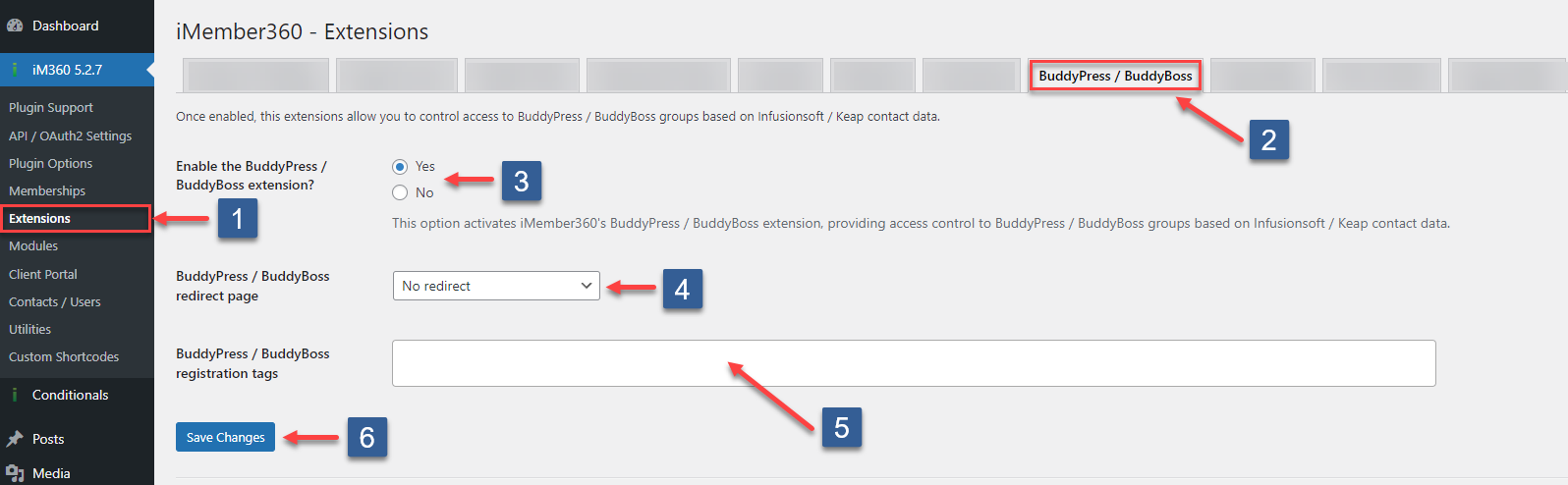
- In WordPress administrator main navigation click iMember360, Extensions.
- In iMember360 Extensions tabs click BuddyPress/BuddyBoss.
- Set Enable BuddyPress/BuddyBoss Extension to Yes.
- In BuddyPress/BuddyBoss redirect page select the default page to redirect users to if they attempt to visit any BuddyPress/BuddyBoss group whose membership is being controlled by iMember360 Post/Page Access Conditions and for which they are not members.
- Select the BuddyPress/BuddyBoss registration tags. This setting is only needed if you want to use the BuddyPress/BuddyBoss registration. Select the tags which should be assigned to the contact in Keap.
- Click Save Settings.
Extension Behaviour
Delete Account Tab
When the iMember360 BuddyPress/BuddyBoss Extension is activated access to the Delete Account tab, normally available for logged in users, will be forbidden. Accessing this tab will result in a redirection to Email Notifications settings.
Allowing a user access to Delete Account to be able to delete their WordPress account is not appropriate for an iMember360 site. When using iMember360 WordPress users can only be deleted by administrators or by using the i4w_clearuser webhook in a Keap automation.
Registration
The BuddyPress/BuddyBoss registration process should not be used when iMember360 is activated on a site.
The signup/purchase processes that are fully integrated with iMember360 and Keap should be used.
We recommend for the BuddyPress/BuddyBoss registration page that the iMember360 panel has Administrator only.
However, the BuddyPress/BuddyBoss signup is supported and automatically syncs the contact data to Keap based on the profile sync fields. If you want to assign tags during the sign-up, please choose the tags in the extension settings explained at step 5 above.
Mention Name
In BuddyPress/BuddyBoss the name displayed for Groups/Forums is called the mentionname.
By default BuddyPress/BuddyBoss uses as the mentionname the WordPress user_nicename.
If BuddyPress/BuddyBoss username compatibility mode is enabled the mentionname is set to the WordPress user_login instead.
If BuddyPress/BuddyBoss username compatibility mode is enabled the mentionname is set to the WordPress user_login (username).
Obviously any software that exposes the WordPress username irrespective of what it is set to is a security risk.
In effect a rogue user/hacker has 50% of the required information to login to the site.
BuddyPress/BuddyBoss has a filter hook which in such circumstances can be used to change the mentionname to whatever you choose:
apply_filters( 'bp_get_displayed_user_mentionname', string $value )
Parameters
| Parameter | Description |
|---|---|
| $value | (string) The mentionname for the displayed user. |
Configuration
Group Membership – Control BuddyPress/BuddyBoss group membership with conditionals.
Automatically add or remove users from BuddyPress/BuddyBoss groups based on iMember360 access conditions including tags, contact fields, and conditionals.
View Documentation →Profile & Account – Synchronize profile fields between BuddyPress/BuddyBoss and Keap.
Set up bi-directional synchronization of profile fields, control access to field groups with conditionals, and manage email/password changes.
View Documentation →