Drip Content
Overview
Drip Content (Gradual Release) allows you to release protected content over time based on when a user joined a specific membership level. Instead of giving members instant access to all content, you can schedule when each page or post becomes available.
This is ideal for:
- Online courses that release lessons weekly
- Membership sites that reveal content progressively
- Training programs with structured timelines
Activation
To enable Drip Content, go to Plugin Options → Main Settings and configure:
- Enable Gradual Release (Drip Content) – Set to "Yes"
- Release Based On – Choose "Days" or "Weeks"
Configuring Release Timing
Once enabled, each protected page or post will show a Release on day (or week) field in the iMember360 meta box.
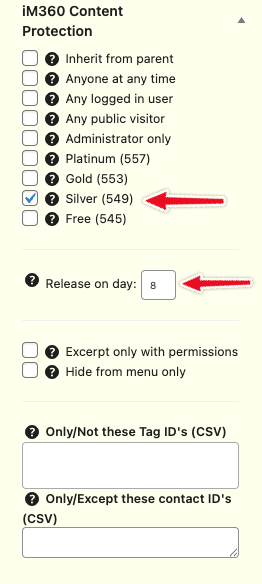
Select the membership level and enter the release day/week number.
Release Timing Reference
The release timing is calculated from when the user joined the membership level:
| Release on Day | When Content Becomes Available |
|---|---|
| 0 | Immediately |
| 1 | Immediately |
| 2 | 24 hours after joining |
| 3 | 48 hours after joining |
| 4 | 72 hours after joining |
The same pattern applies when using weeks instead of days.
tip
Use the [i4w_user_registered] shortcode to display when a user joined:
You have been a member since [i4w_user_registered format='F jS, Y']